
SenderID Registration Guidelines (Masking)
Required Documents & Instructions for Registering SenderID (Masking)
Some things you should know before starting to register for SenderID (Masking)
Please note that the requirements and regulations in some countries for example Indonesia, sometimes documents need to be signed by the customer to ensure that the registration is properly carried out on behalf of the customer/client who has the right to use the brand name. This serves to ensure that the traffic / traffic really comes from a legitimate source and minimizes the potential for misuse of a brand’s Masking / Sender ID.
Instruction
For starters, please download the document and complete the data to carry out the MASKING/SENDER ID registration process in several countries. To register your Alphanumeric Sender ID, Indonesian cellular network operators Telkomsel, XL, Hutchison, Indosat, and Smartfren require you to provide the following information:
- Screenshots of your website homepage and user login page
- Screenshots of Tax Number (NPWP)
- Form Message
- Letters of Authorization for each operator.
- If your company is an Indonesian legal entity, complete the documents in the Domestic Customer Templates folder.
- If your company is incorporated outside Indonesia, complete the documents in the International Customer Templates folder.
In order to be processed as quickly as possible, please fill out the document completely and accurately, and provide any other information that may be required. Use the examples provided for guidance. Note that mobile network operators are very strict about the details!
Provide required screenshot
You need to provide a screenshot of the following:
Home of your website
User login page, from website and mobile app
Company NPWP Card

Complete the Message Format and LOA forms
After you download the form, follow these general instructions :
- Fill in the yellow highlighted fields — completely replace each field with your own information. If a field is not highlighted, do not change it.
- If you have questions about how to fill in the required fields, take a look at the annotated examples we provide for each field.
- Have the document signed by an authorized signatory of the Shipper.
- In the green highlighted field, add letterhead and/or Sender logo, and signature where indicated.
- Uploaded form.
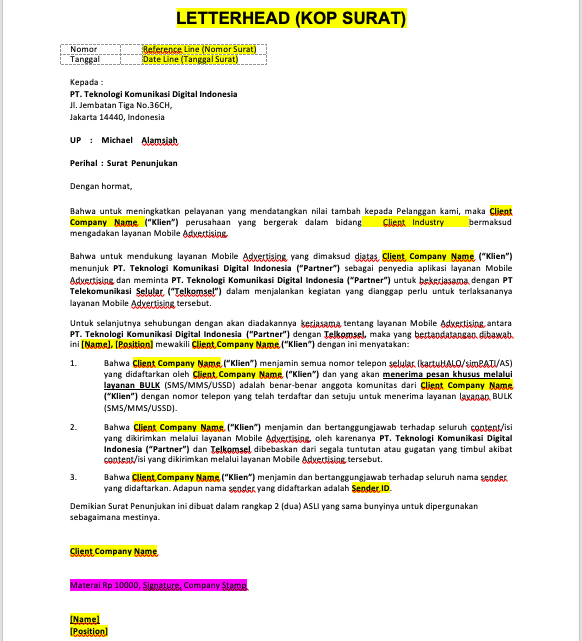
Please download and fill the documment for each operator
